



When I need to replace worn-out trainers or find shoes for a specific occasion, I usually want a quicker route than opening several shopping sites and rebuilding the same search each time. DSW Designer Shoe Warehouse is aimed at that exact moment: I can browse shoes, boots, and handbags from a phone, narrow the selection, and move from browsing to buying without treating the app like a general-purpose marketplace. After spending time with it, I found that its biggest strength is focus. It feels built for someone who already knows they need footwear or an accessory, rather than for someone casually exploring every kind of product.
The app is free, carries an Everyone age rating, and comes from Designer Brands Inc. It has been available since May 24, 2017, and the current release is 4.206.0 for devices running operating system version 9 or later. That broad compatibility matters if you are using an older phone, although the experience still depends on how comfortably your device handles a modern retail interface. With more than a million installs and an average rating of 4.4 from roughly 33 thousand ratings, it has clearly become a familiar shopping tool for a substantial audience.
From a vague need to a shortlist
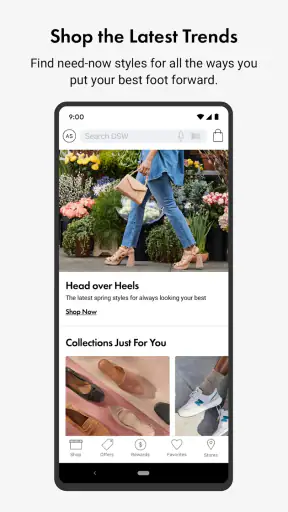
My most useful starting point was not opening the app with a brand in mind. It was beginning with a practical problem: I needed a pair of shoes that would work for everyday use, but I did not yet know the exact style. That is where a dedicated footwear app has an advantage over a broad retailer. The product area is narrower, so the first decision feels less scattered. I can move between shoes, boots, and handbags without wading through unrelated departments.
The first useful habit is to decide what I am actually trying to solve before searching. “I need black shoes for work” is a better starting condition than “I want to see what is available.” The former gives the browsing process a purpose. I can then use the app to compare silhouettes and categories instead of collecting attractive items that do not fit the occasion. This sounds simple, but it prevents one of the most common shopping mistakes: confusing visual appeal with suitability.
For a family purchase, the starting condition changes. I may be looking for children’s footwear, a practical pair for another adult, or several items at once. In that situation, I treat the app less like a fashion feed and more like a checklist. I identify the wearer, intended use, size requirement, and acceptable style before I begin. That makes the handoff from discovery to decision much cleaner, especially when another person needs to approve the choice.
The app works best when I enter with a shopping job, not just a shopping mood. Its focused inventory is helpful, but it does not remove the need to make a decision about use, fit, and timing. If I only want broad fashion inspiration across clothing, home goods, and accessories, a general retailer or visual discovery service may give me more variety. DSW is more useful when shoes or handbags are already central to the task.
Searching without losing the reason I started
Once I have a purpose, I browse by product type and then reduce the field. I find it easier to compare a small group of plausible choices than to scroll endlessly through every appealing design. A practical workflow is to keep one option for comfort, one for appearance, and one for flexibility. That turns browsing into a trade-off instead of a popularity contest between products that may serve different needs.
One non-obvious advantage of shopping this way is that I can separate the “must have” requirement from the “nice to have” detail. For example, a boot may need to be suitable for regular walking before its color or decorative finish matters. A handbag may need to carry a particular set of daily items before its shape becomes the deciding factor. I use the app to create a shortlist, but I make the final judgement against the real routine the item must survive.
Another useful approach is to search in stages. I begin broadly enough to understand the available styles, then narrow only after I see whether my original idea is realistic. If I filter too aggressively at the beginning, I can accidentally hide alternatives that would solve the same problem better. This is especially relevant when I am shopping for a gift or replacing an old favorite whose exact design is no longer the only sensible option.
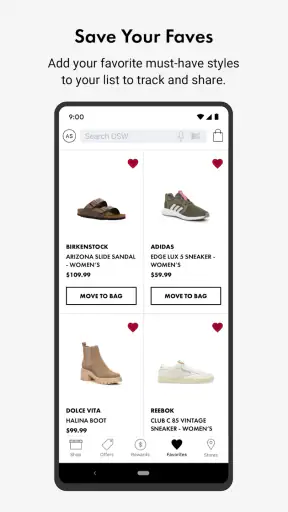
The app is also a better fit for deliberate comparison than for rushed impulse buying. I can pause over a product, think about whether it belongs in my wardrobe, and return to the shortlist. That slower rhythm is valuable when the purchase needs to coordinate with clothing I already own. It is less satisfying if I expect the app to make the entire style decision for me.
Checking fit, context, and the cost of getting it wrong
Footwear shopping has a special weakness: a product can look perfect on a screen and still be wrong for my feet or routine. I never treat a product image as proof of comfort. Before committing, I consider whether I am replacing a familiar shape, trying something structurally different, or buying for an event where I will stand for hours. The app helps me reach the product, but it cannot replace my knowledge of how I normally respond to a particular type of shoe.
This is where the workflow can slow down. If I am uncertain about sizing, I become more cautious and spend longer comparing details. That is not a fault unique to this app, but it affects the value of mobile checkout: speed is not helpful if it encourages a careless choice. I would rather spend another minute examining the item and checking the practical details than treat a convenient purchase as a guaranteed fit.
For a gift, I add another layer of risk. The recipient may care about comfort, brand, color, or shape in ways I cannot predict. In that case, a highly specific choice may be worse than a more adaptable one. I use the app for discovery, but I ask myself whether the product is genuinely appropriate for that person rather than assuming a recognizable label will settle the matter.
Handbags create a similar issue in a different form. The question is not only whether the bag looks good; it is whether it supports the person’s daily carry. I mentally test the intended use: commuting, a dinner, travel, or ordinary errands. A beautiful option that cannot accommodate the essentials is not a successful result. The app makes it easy to browse the category, but the final evaluation still has to happen in real-life terms.
Moving from my phone to the purchase decision
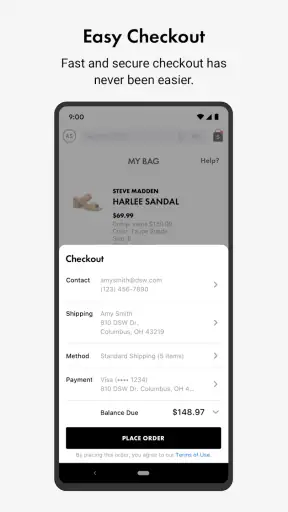
The important handoff is the moment when browsing becomes commitment. I try to make that transition only after I can explain why one option is better for my situation than the others. If I cannot do that, I am probably still browsing. This simple rule keeps the cart from becoming a storage area for uncertain choices.
For a personal purchase, the handoff is mostly internal: I move from visual comparison to checking the selected item and deciding whether to proceed. For a shared purchase, the handoff may involve sending the product information to someone else for approval. That can introduce friction because the other person may ask about color, intended use, or fit after I have already moved on. I therefore keep the shortlist small and record the reason each candidate made it through.
For a time-sensitive need, such as an upcoming event, I would not rely on browsing alone. I would make the purchase decision early enough to allow for the possibility that the item does not work in practice. The app can reduce the time spent finding candidates, but it does not remove the uncertainty of footwear fit or personal taste. That distinction is important for anyone expecting a mobile retailer to provide a completely risk-free solution.
The free price of the app makes trying this workflow easy. I can install it without adding an app charge to the shopping decision, which is useful if I only need it for a single purchase. Still, “free” does not mean the process has no cost: my time, attention, and the consequences of choosing poorly still matter. I judge the app by whether it helps me make a better purchase, not simply by whether it opens without a fee.
What happens after the choice
The result I want is not merely a completed order. It is confidence that I selected the right kind of item for the original need. When the app helps me move from a vague requirement to a short, sensible selection, it has done its job well. That is the strongest outcome I experienced: less scattered browsing and a clearer connection between the product and the situation in which I will use it.
It is also useful for repeat shoppers. If I already understand the sort of footwear that works for me, a dedicated shopping app can shorten the path from “I need another pair” to “these are the candidates worth considering.” The benefit is greater when I shop within the same product categories regularly. Someone who buys shoes only once every few years may not notice as much value, particularly if they are comfortable using a browser.
The app can support different levels of involvement. A confident shopper may move quickly through the process, while a careful shopper can use the same environment for comparison. I prefer the second approach because footwear purchases are personal and sometimes expensive in time even when the app itself is free. The interface is most useful as an organized starting point, not as a substitute for judgement.
Its scale also gives it a sense of established use. The app has around 17 thousand written reviews, alongside its broader rating activity, and that makes it easier to see that the product is not an obscure experiment. I would still read recent user feedback with a critical eye, because ratings describe many different phones, shopping habits, and expectations. A high average is encouraging, but it is not a guarantee that every browsing or checkout experience will feel identical.
Where the workflow breaks down
The first break happens when I expect the app to solve a fit problem that only trying on can settle. Digital browsing can narrow the choice, but it cannot tell me with certainty how a shoe will feel after several hours. If comfort is the main concern and I have no experience with the style, a physical shopping option may be better, or at least a safer part of the decision. The app is strongest before that uncertainty becomes unavoidable.
The second break is over-filtering. A narrow search can feel efficient, yet it may remove a product that would have been a better match in practice. I have found that it is smarter to begin with the use case and broad product type, then refine gradually. This keeps the process from becoming a technical exercise in selecting filters instead of a genuine search for the right item.
Another limitation is that the app is not the best universal alternative for every kind of shopping. A general marketplace may be preferable when I want to compare a much wider range of unrelated products in one order. A brand-specific app may be better when I already know the exact label and want its complete collection. A local store can be better when immediate physical inspection matters more than convenience. DSW occupies a useful middle ground: more focused than a general marketplace, but not necessarily the final destination for a single-brand search.
I also would not recommend it as the only tool for someone who dislikes making style decisions on a screen. The app can show me possibilities, but it does not know my wardrobe, walking habits, or tolerance for breaking in a new pair. If I need personal guidance, I may get more value from visiting a store or asking someone who understands my preferences. The mobile workflow is convenient, not magically personal.
Who should use it and who should skip it
I would recommend DSW Designer Shoe Warehouse to people who regularly shop for shoes, boots, or handbags and want a dedicated place to begin. It is especially practical for a shopper who likes comparing several categories from a phone, already has a general idea of the need, and prefers to make a considered decision rather than wander through a broad retail catalog.
It can also suit households where one person researches and another approves. The researcher can narrow the options before handing the decision over, which is more manageable than asking someone else to review an entire product department. That workflow is useful for gifts, family purchases, and shared wardrobes, provided both people agree on the practical requirements before the shortlist is made.
I would skip it if my main goal is broad, cross-category shopping, if I need immediate certainty about fit, or if I already know I want one specific brand’s complete range. In those cases, another route may reduce friction. I would also avoid treating it as a replacement for trying on footwear when the purchase is for a demanding routine, a special event, or someone whose sizing is difficult to predict.
For most other shoppers, the decision comes down to expectations. If I want a focused footwear and handbag shopping tool that helps organize discovery, it is a sensible free download. If I expect personalized styling, perfect fit prediction, or a completely effortless path from image to satisfaction, I will probably find the experience more limited.
My final take after following the full journey
I see the app as a practical bridge between a real-world need and a manageable product shortlist. Its value is not that it turns shopping into a single tap; its value is that it keeps the search centered on shoes, boots, and handbags while giving me room to compare. The best results came when I entered with a clear use case, narrowed gradually, and treated fit and suitability as decisions I still had to own.
Designer Brands Inc. has made a focused shopping app that is easy to justify for regular footwear shoppers. The broad device support, free download, and established user base make it approachable, while the category focus gives it a clearer purpose than a general retail app. My reservations are equally clear: screen-based browsing cannot remove fit uncertainty, and shoppers who need broad merchandise or hands-on advice may be better served elsewhere.
In my experience, I would keep it installed for planned shoe or handbag purchases rather than use it as a daily browsing habit. When I know what problem I am trying to solve, it helps me get from starting condition to decision with less noise. When I do not know what I want, or when trying on is the most important part of the purchase, I would use a different route. That balance is what makes it worthwhile: focused enough to save time, but not so ambitious that it pretends mobile shopping can replace personal judgement.


